Table of Contents
Stale Alarms Report
Definition: Stale alarms are alarms which are/were on for 24 hours or more.
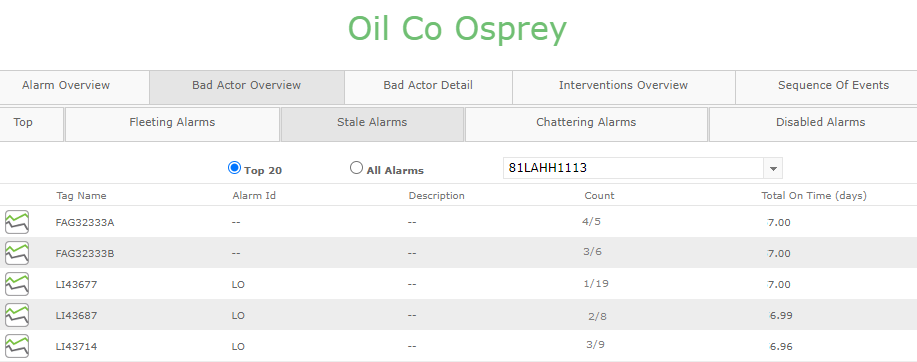
The picture above shows an example Stale Alarm Report.
By default, the report shows the Top 20 stale alarms (sorted by “Total On Time”) for a defined reporting period (e.g. 1 Oct 2020 00:00:00 - 1 Nov 2020 00:00:00).
The calculated metrics are:
- Count: Number of Stale Alarms / Total Number of Alarms, for reporting period.
- Total on Time (days): The accumulated on-time of stale alarms.
Stale Alarm Detection
Alarm Analysis operates on Reporting Periods. That is, Alarm Analysis compiles metrics for a given date-range and will only detect a Stale Alarm if it transitions (annunciates or returns) within the reporting period.
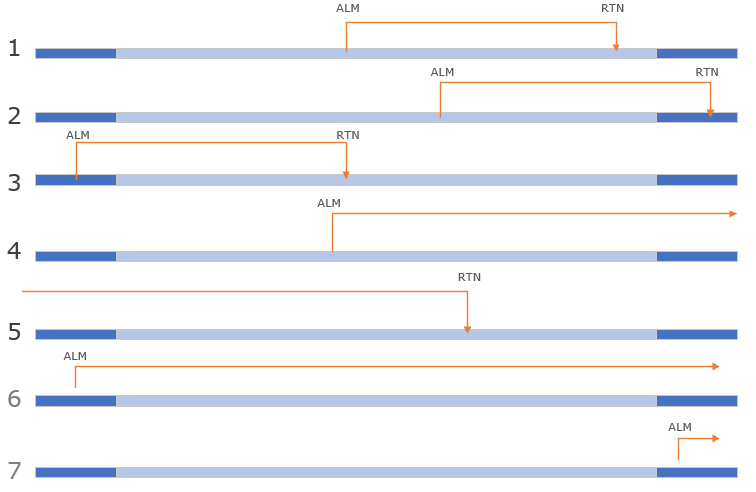
With reference to the above illustration, the Stale Alarm report includes alarms that…
- were on for 24 hours in the selected period (1).
- transitioned after 24 hours (or more) in the selected period (2,3)
- were on for longer than 24h but haven't returned to normal within the selected period (4).
Example 5 has no associated Alarm, therefore no on-time can be calculated and thus omitted.
Examples 6 and 7 transition outside the reporting period and are therefore omitted
Stale Alarm Duration
Duration is always reported within the start and end boundaries of a report period. 1). This provides an accurate metric for assessing an alarm was stale for a given month.
For example,
With reference to the above illustration…
Example 1 reported duration aligns with the actual alarm duration as it falls within the report boundary.
Examples 2, 3 and 4 are cropped to the report boundary.
Example 5 has no associated alarm, therefore no on-time can be calculated and thus omitted.
Examples 6 and 7 transition outside the reporting period and are therefore omitted
Gestalt PnID Support
Individual values from the Stale Alarm report can be displayed in Gestalt PnID dashboards via Alarm Analysis meta tags:
- [Company]/[Asset]/Stale report/[row].tag
- [Company]/[Asset]/Stale report/[row].tagDescription
- [Company]/[Asset]/Stale report/[row].alarmIdentifier
- [Company]/[Asset]/Stale report/[row].eventAddress
- [Company]/[Asset]/Stale report/[row].count
- [Company]/[Asset]/Stale report/[row].overallcount
- [Company]/[Asset]/Stale report/[row].totalontime
For example, referencing Oil Co/Osprey/Stale report/1.tag will return the tag name from row 1 of the Stale Alarm report.
Gestalt Trend Support
The numeric values of the Stale Alarm report are not suitable for Trend display as they intended to only ever return single values for the full report period.
Power BI Support
All values from the Stale Alarm report can be displayed in Power BI dashboards via Alarm Analysis meta tags:
- [Company]/[Asset]/Stale report/[number of rows].tag-a
- [Company]/[Asset]/Stale report/[number of rows].tagDescription-a
- [Company]/[Asset]/Stale report/[number of rows].alarmIdentifier-a
- [Company]/[Asset]/Stale report/[number of rows].eventAddress-a
- [Company]/[Asset]/Stale report/[number of rows].count-a
- [Company]/[Asset]/Stale report/[number of rows].overallcount-a
- [Company]/[Asset]/Stale report/[number of rows].totalontime-a
For example, referencing Oil Co/Osprey/Stale report/20.tag-a will return the the first 20 tag names from the Stale Alarm report.